Writing7 min read
Blueprint: Persist Kafka Audit Messages to Postgres with Kafka Connect (No Schema Registry Required)
A practical blueprint for reliably sinking high-volume Kafka audit messages into Postgres using Kafka Connect—boosting throughput from days to minutes with a lightweight SMT that adds the required schema without changing the existing data stream
KafkaKafka ConnectPostgreSQLSink ConnectorSMTDocker ComposeEvent StreamingData EngineeringPerformanceAudit LogsConfluent
Introduction
In this blog post, I am sharing my blueprint implementation to save Kafka messages in relational database (Postgres) using Kafka Connect. While this may not be the only way to achieve this, this is the easiest and most easy-to-maintain approach I have found so far.
Background
Few years ago, I came across this requirement (as part of my work as a Software Engineer) to backup stream of audit messages in a Kafka topic into a relational database. Even though there were many ways to achieve that, I chose to implement a custom java microservice (using Spring Boot and Apache Camel) at that point to consume Kafka messages. This worked great for us for around 2 years until we hit a performance issue. One of the processes that we were working on was generating around 200K records in a short period (1-2 hours) and my custom microservice to consume audit records took 1.5 days to consume all these audit records. Our original plan was to improve the existing microservice by introducing more parallelism into the processing ( improving the bottlenecks in the code), increasing resources of the k8s deployment ( vertical scaling) or adding more instances of the same microservice so that each Kafka partition in the source topic will be processed by a separate instance ( horizontal scaling). While working on the initial research on this improvement, I came back to fundamental requirements and tried to evaluate alternative approaches to solve the same problem. As a result of that, I came across with the Kafka Connect Postgres Sink Connector and decided to try it.
Kafka Connect
Kafka Connect is a free and open-source component that acts as a hub between Kafka and other data handling mechanisms. We can put as much as connectors/plugins in any Kafka Connect instance to manage data in and out. For instance, we can put a connector to store data from Kafka topic into a S3 bucket. On the other hand, we can put another connector to pull data out from relational database such as MySQL and push to a Kafka Topic.
Architecture
The idea is simple here. To achieve our requirement mentioned above, we will place a Kafka connect instance between Kafka and Postgres Database. We can use the existing Postgres sink connector from the confluent connector store to process the messages.
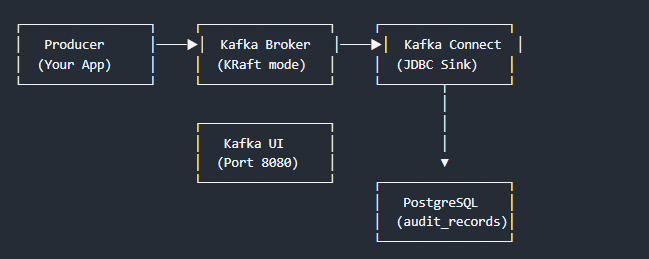
Proof of Concept (PoC)
I used docker and docker compose to do the PoC for this. First, I had to build a custom docker image with the base Kafka Connect image to include the Postgres sink connector and SMT Transformer component.
What is SMT Transformer
Postgres Sink Connector expects Kafka messages to have a schema along with it. Either the schema should be embedded (both message values and schema are in the same JSON) or linked schema registry should contain the schema for all messages in the topic. But in my requirement, it was not possible to do any of this (since this was an already existing data stream). So, I had to introduce a simple custom Java component with just one class to convert the plain message to have schema within it. Source code of the SMT Transformer can be found . This contains single pom file and single Java file as in the provided link. In addition to binding the schema into the message, this transformer validates the messages strictly for the types.