Blueprint Part 2: Running the Kafka Connect Postgres Sink on a Secured Kafka Cluster (Group IDs, ACLs and Authorization Failures)
A follow-up to the Kafka Connect to Postgres blueprint. Why a Kafka Connect sink fails with authorization errors on a secured cluster even when the same group ID works for other applications, and the exact permissions, group IDs and client settings Kafka Connect really needs.
In the first part of this series, I shared a blueprint to persist Kafka audit messages into a Postgres database using Kafka Connect, the Aiven JDBC sink connector and a small custom SMT. At the end of that post I mentioned that I did not worry too much about security, as it was out of scope for the theory being tested.
In this post, I am covering exactly that missing piece. When you take the same setup and point it to a Kafka cluster that has authentication (SASL/SSL) and authorization (ACLs) enabled, there is a good chance that your connector will fail with an error like the one below.
org.apache.kafka.common.errors.GroupAuthorizationException: Not authorized to access group: connect-audit-records-jdbc-sink
or
org.apache.kafka.common.errors.TopicAuthorizationException: Not authorized to access topics: [kafka-connect-configs]
The confusing part is that the user and the group ID you configured are usually perfectly fine. The same credentials and the same group ID work without any issue in other consumer applications. So, what is different with Kafka Connect?
The short answer is: Kafka Connect is not just a consumer. It is a small distributed system on its own, and it talks to Kafka in more ways (and with more group IDs) than a typical consumer application.
How Kafka Connect talks to Kafka
In a typical Spring Boot (or any other) consumer microservice, there is one consumer, one group ID and one or more topics to read from. The permission model is simple: Read on the topic and Read on the group.
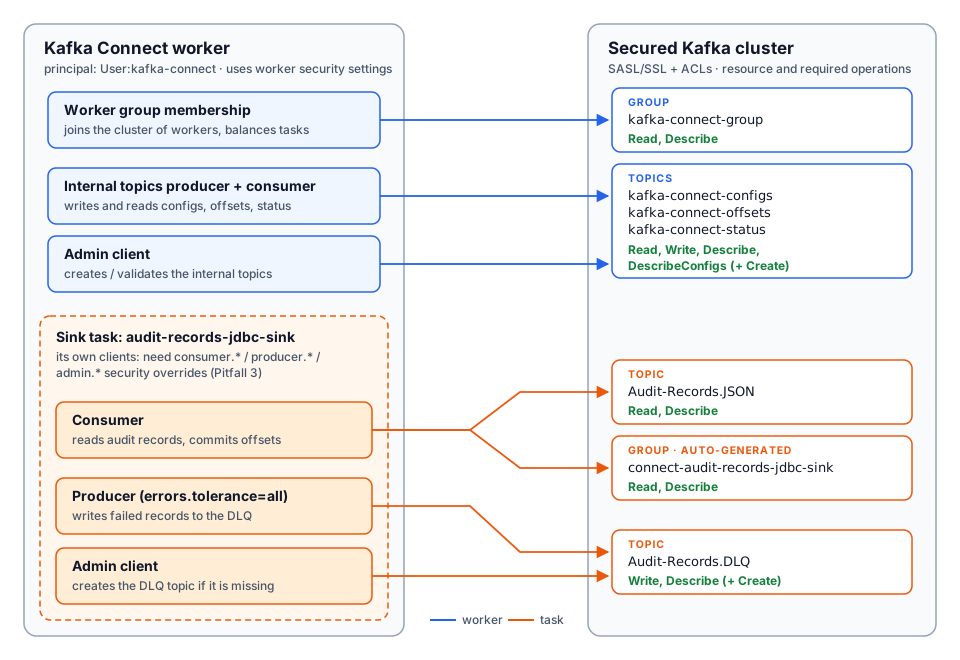
A Kafka Connect worker running in distributed mode (as in Part 1) creates several Kafka clients under the hood.
So, the worker is a consumer, a producer and an admin client at the same time, and it uses two consumer groups. Each of these needs the right permissions, and each of these needs the right security settings. Almost every authorization failure I have seen with Kafka Connect falls into one of the three pitfalls below.
It is very natural to assume that this is the group ID used to consume Audit-Records.JSON. This group ID is only used by the Connect workers to find each other, form a cluster and balance connectors and tasks between them.
The sink task that actually reads the messages uses a separate consumer group, and its name is generated automatically from the connector name.
connect-<connector name>
For the connector we registered in Part 1 ("name": "audit-records-jdbc-sink"), the consumer group becomes:
connect-audit-records-jdbc-sink
Group
Where it comes from
Used for
kafka-connect-group
group.id in the worker properties
Worker cluster coordination
connect-audit-records-jdbc-sink
Generated as connect-<connector name>
Consuming Audit-Records.JSON
In a secured cluster, ACLs are often granted for a specific group name (or a prefix such as my-team-). If only your approved group ID has an ACL, the worker may start fine, but the sink task will fail with GroupAuthorizationException because it is trying to join connect-audit-records-jdbc-sink, a group that nobody has granted access to.
You can confirm which group the task is using with the command below.
Ask your Kafka administrators to grant Read on the group connect-audit-records-jdbc-sink. If you plan to run multiple connectors, granting a prefixed ACL on connect- is easier to maintain (examples are given later in this post).
Fix option B: Override the consumer group of the connector
If you must use a pre-approved group ID, you can override the group ID of the connector's consumer in the connector configuration.
{
  "name": "audit-records-jdbc-sink",
  "config": {
    "connector.class": "io.aiven.connect.jdbc.JdbcSinkConnector",
    "topics": "Audit-Records.JSON",
    "consumer.override.group.id": "my-team-audit-archiver",
    "...": "rest of the configuration from Part 1"
  }
}
For consumer.override.* properties to be accepted, the worker must allow client overrides. This is controlled by the worker property below.
connector.client.config.override.policy=All
All is the default since Kafka 3.0, but many hardened setups set it to None or Principal (Principal only allows overriding the security related properties, not group.id). If the override is rejected, you will see a validation error when you register the connector.
Important: Do not use the same value for the worker group.id and the connector's consumer group. The worker group uses the connect group protocol and the sink task uses the consumer group protocol. If they share a name, one of them fails with InconsistentGroupProtocolException. In practice, this means you need two approved group IDs: one for the workers and one per connector.
Pitfall 2: The worker needs more than consumer permissions
In Part 1, Kafka Connect created its own internal topics during startup, because there were no restrictions on the local broker. These three topics are configured in the worker properties.
The worker writes to these topics (connector configurations, source offsets and connector/task status) and reads them back to keep all the workers in sync. It needs all three topics at startup, even if you only run sink connectors. If the principal does not have Write on these topics, the worker fails to start (or keeps failing) with a TopicAuthorizationException, even before your connector is registered.
On top of that, the dead letter queue we configured in Part 1 (errors.deadletterqueue.topic.name) means the sink task also has a producer that writes failed records to Audit-Records.DLQ.
So yes, the Kafka Connect principal needs to be both a consumer and a producer. Below is the full list of permissions required for this blueprint.
Resource
Type
Operations
Why
kafka-connect-configs
Topic
Read, Write, Describe, DescribeConfigs (+ Create if auto-created)
Store and read connector configurations
kafka-connect-offsets
Topic
Read, Write, Describe, DescribeConfigs (+ Create if auto-created)
Store and read source connector offsets
kafka-connect-status
Topic
Read, Write, Describe, DescribeConfigs (+ Create if auto-created)
Store and read connector/task status
kafka-connect-group
Group
Read, Describe
Worker coordination
Audit-Records.JSON
Topic
Read, Describe
Sink task consumes the audit messages
connect-audit-records-jdbc-sink (or override)
Group
Read, Describe
Sink task consumer group and offset commits
Audit-Records.DLQ
Topic
Write, Describe (+ Create if auto-created)
Sink task writes failed records
Cluster
Cluster
IdempotentWrite (only for brokers older than 2.8)
Producers are idempotent by default
Pre-create the internal topics
In a secured cluster, applications are usually not allowed to create topics. In that case, ask your administrators to create the internal topics and the DLQ upfront. The internal topics have a few strict requirements that are easy to miss.
kafka-connect-configs must have exactly one partition.
All three internal topics must be compacted (cleanup.policy=compact). The worker validates this on startup and refuses to start if a topic is configured with delete.
Use the replication factor of your cluster (usually 3). The value 1 used in Part 1 only makes sense for a single-broker local setup.
Tip: If the same Kafka cluster hosts multiple Kafka Connect clusters, each Connect cluster must have its own group.id and its own three internal topics. Sharing them between Connect clusters causes very strange behaviour (connectors appearing and disappearing, tasks restarting).
Granting the ACLs
Below is a sample set of ACLs using kafka-acls.sh, assuming the Kafka Connect principal is User:kafka-connect. Your administrators may use a different tool (or a UI), but the resources and operations stay the same.
Pitfall 3: Security settings are not inherited by the connector clients
This is the one that surprises most people (including me). When you add SASL/SSL settings to the worker properties, it is natural to expect every Kafka client inside the worker to use them.
These top-level settings are only used by the worker's own clients (group coordination and the internal topics). The consumers, producers and admin clients created for connectors do not inherit them. They are configured separately using the consumer., producer. and admin. prefixes.
If you use SSL truststores/keystores, they need the same treatment (consumer.ssl.truststore.location, producer.ssl.truststore.location and so on).
What happens if you miss these depends on the listener you are connecting to.
On a SASL-only listener, the task clients fall back to PLAINTEXT and you usually see connection errors and timeouts (for example, Bootstrap broker ... disconnected) rather than a clear authorization error.
On listeners where an unauthenticated or differently authenticated connection is possible (for example, SSL with optional client authentication), the task connects as a different principal (often User:ANONYMOUS), which has no ACLs, and you get an authorization failure, even though the worker itself started with the correct user.
In both cases the giveaway is the same: the worker is healthy, but the task is FAILED.
Tip: If different connectors should use different users, you can set the credentials per connector using consumer.override.sasl.jaas.config (and producer.override.*, admin.override.*) in the connector configuration. This works with the Principal override policy as well.
Putting it all together
Below is the worker configuration from Part 1, updated for a secured cluster.
The remaining properties (JDBC connection, upsert mode, SMT and converters) are the same as in Part 1.
Troubleshooting checklist
When you hit an authorization failure, the first step is to find out which client failed. The connector status endpoint gives you the stack trace of a failed task.
If the REST API itself does not respond, the worker never started, and you need to check the worker logs (docker logs kafka-connect) instead.
Then use the table below to map the error to the cause.
Symptom
Likely cause
Section
Worker does not start, TopicAuthorizationException on kafka-connect-*
Missing ACLs on internal topics
Pitfall 2
Worker does not start, GroupAuthorizationException on kafka-connect-group
Missing ACL on the worker group
Pitfall 2
Worker refuses to start, complaining about cleanup.policy
Internal topics not compacted
Pitfall 2
Task FAILED, GroupAuthorizationException on connect-...
Generated consumer group has no ACL
Pitfall 1
Task FAILED, TopicAuthorizationException on Audit-Records.JSON
Missing Read ACL, or task using wrong principal
Pitfall 2 / 3
Task FAILED, TopicAuthorizationException on Audit-Records.DLQ
Missing Write (or Create) ACL on the DLQ
Pitfall 2
Task FAILED with timeouts / disconnects, worker healthy
Missing consumer. / producer. security settings
Pitfall 3
InconsistentGroupProtocolException
Worker and connector share the same group ID
Pitfall 1
After fixing the ACLs or the configuration, restart the failed task (a task does not recover by itself after a fatal error).
curl -X POST "http://localhost:8083/connectors/audit-records-jdbc-sink/restart?includeTasks=true&onlyFailed=true"
Conclusion
Moving the Kafka Connect blueprint from a local Docker setup to a secured Kafka cluster is mostly about understanding that Kafka Connect is not a simple consumer. It uses two consumer groups (one for the workers and one per sink connector), it produces to its own internal topics and to the DLQ, and it creates separate Kafka clients for connectors that do not inherit the worker's security settings.
Once you know these three things, the authorization errors become easy to reason about, and the conversation with your Kafka administrators becomes much simpler: you can hand them the exact list of topics, groups and operations that Kafka Connect needs, instead of going back and forth with one error at a time.